A Few Reflections as a Product Manager Building a Demo Using the Claude system
One company I interviewed for asked me to build a demo over the course of a week. They chose a problem space central to their mission, and which I knew very little about. They gave me the assignment on Monday morning, and wanted me to complete it within 5 business days. I gave myself the goal of getting it done by Friday night so I could enjoy Father’s Day with my son. This meant I had under 5 business days to research, design, and implement the demo. I then had to record a 10 minute demo and prepare for a follow up debrief. I decided to use the Claude systems to organize and execute the project because of a conversation with a friend about the usefulness of agents . It felt like a good, “core” use case to explore.
It proved informative.
This post focuses on my experience. For more information on the demo, and the video, check out the project page.
Pre-work
I read the materials provided and set up the product brief with a template I built years ago. This put initial shape to my plans and freed me up to explore the domain and problem space. I realized there would be a steep learning curve in the domain of AML. This gave me pause. I needed a strategy for completing the task within a week.
When a project goes beyond my comfort zone I fall back on scaffolding I’ve built over the course of my career. I break them down into small steps, organized around a basic model of inquiry:
Analyze the problem- focus on gathering information at a high level so I can map the systems at play.Ideate about approaches- take gathered information and mold it along possible dimensions of use.Validate with people- bring ideas to human beings to determine if others think it’s a valuable, and workable, course to take.Build prototypes- build the foundational prototypes with as much real functionality as it merits.Revalidate direction with people- show people the prototypes to determine how far off I am from a servicable project or portfolio.Iterate with testing- repeat steps 4 and 5 with the addition of measurable tests until the project is ready for sign off.Verification and sign off- check the project against stated goals, requirements, user journeys, and acceptance criteria. Measure risk. Decide if the value of the project is greater than the risks of launching it based on all known information.Monitor what you can- focuse on monitoring performance (in the form of meeting human’s expectations and adhering to project goals) after launch to determine when it’s time to revisit the assumptions and choices that led to the current system design and build.
These eight steps seem like Engineering methodologies or an SDLC (Software Development Life Cycle). That’s intentional. I’ve found several good methodologies over the years (e.g., The data science life cycle, CRISP-DM, CRISP-ML(Q), NASA Systems Engineering Handbook) and I pick the parts that feel stable across domains. When something doesn’t work, I look to other domains for inspiration and to check the choices I make. Being methodical and systematic stands at the core of my success over the years. Why am I telling you this? Because the convenience of Claude Code and Co-work threatened that… for a few hours.
How it started
First, I reviewed the goals and constraints in the documents I received. This allowed me to write a rough product vision, principles, and key capabilities. I did not, yet, know enough about the domain to determine if what I had come up with aligned at all with expectations. I decided to leverage Claude Cowork to help me research the answers to my inquiry. I had the system review my product vision. I wanted to know if the principles and key capabilities aligned well with it. This led me down a rabbit hole. Because of the initial feeling of success, I tried to leverage the system to create my whole project plan. In for a penny, in for a pound.
I managed to use Claude to create a build plan and user stories within a few hours. It might sound like an out-and-out win for the tech boosting efficiency. It wasn’t. I felt a sense of continual submission and an indefinable ickiness every time I reviewed the work. It felt less like I was making choices and more like I was cogitating on behalf of the system. It had full control over the implementation details and was trying to guide me to do what it thought was better. This scared me, to the point I almost abandoned the effort wholesale. My friend and collaborator, Zoe, stopped me.
We have a standing weekly meeting on Monday evenings. We started in on how people leverage LLM-based systems. The conversation moved to coding because I couldn’t help but mention my project. We shared how they make us both feel when we use them. A phrase, “creation through consumption”, captured how we most felt about the technology. For me it also resonated with how I had felt all day. Indefinable ickiness became defined horror with my own choices. The system supplanted my will, temporarily, by making things too easy. I realized the system had hijacked my ability to make intentional decisions about what I wanted to create. Knowing this, I took the night off and decided to revisit it in the morning. A few questions that I want to share at this point:
- Was the work I did with cowork helpful? Certainly. I explored the technology and the domain in an semi-structured way. Claude Cowork performed search and summarization tasks well enough for me to move forward in hours, when it might have taken me a day or two.
- Did it make me more efficient? No. I felt it allowed me to race through things I dwell on. I felt uncomfortable skipping those parts because the deep thinking happens there. So I had to redo everything myself after thinking through it without AI trying to co-opt my thinking.
- Can I find a way to keep myself in the driver’s seat in future projects? I hope so. This was my first time using this technology farther than I would be willing to consider, to do that I had to force my guard down. In the future, I will follow my process and identify where agents can take off some of the burden.
Giving it a second go
The next morning I woke up with a renewed sense of purpose. I wanted to shape the system to create what I envisioned for the project. I would not let the Claude systems create on my behalf and try to sell it to me as what I wanted. This required scrapping the user stories and the build plan I created using Cowork so I could create my own. I redefined the vision of the product. It contained 10 user stories, 18 specific requirements to cover them, and included my interpretation of the task’s goals. Each of these elements drew inspiration from the work I’d already done. They reflected my intentional choice to focus on what I know of the context.
I then directed Claude Code to create a new build plan based on my first iterative prototype and the new direction it provided. I had it create two phases and use “spec gates” to ensure the demo met all the requirements. Based on the work I’ve seen and done over the past 3 years, I believed the system could provide a better format for managing its own tasks. This led to a functional document I could review. The document lived seperately from any messages I sent to Claude. It helped me check alignment with my vision for the product. I took an hour to review the build plan and then set it to task.
It took about 20 minutes for the model to review the document, codebase, and refactor it. I then tasked the system with self assessment based on the spec gate and live code. It came up with a handful of questions. I noticed they occurred because I’d implied a direction without explicitly stating it. There was also an incident where Claude could not parse my guidance without bringing it into conflict with itself. I addressed the questions in order. And, after another ~30 minutes the demo met the acceptance criteria in the first phase of the build plan.
Finding my stride
I gained confidence in my ability to guide the model towards my desired end state by the end of the first phase. The second phase produced a functional prototype by the end of Wednesday afternoon. This gave me space to breathe and reflect. I could focus on whether it resonated with the goals of the project. Two elements appeared to be missing:
- the ability to scale to hundreds of scenarios and thousands of rules
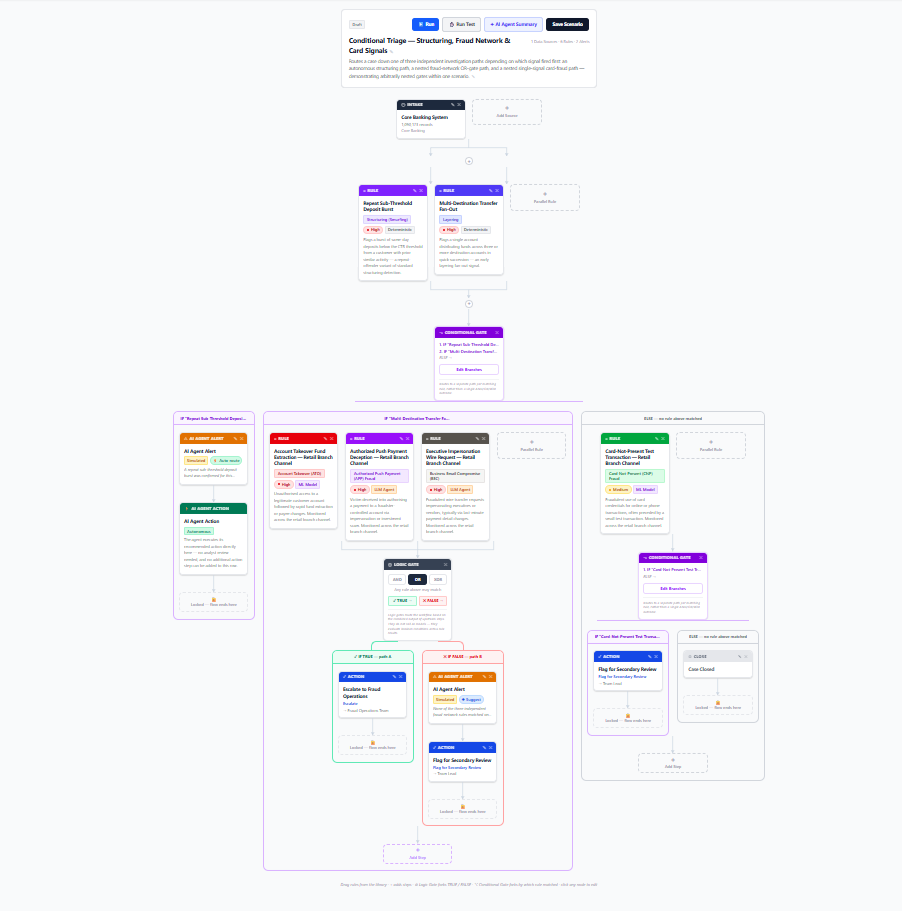
- the ability to orchestrate rules into a complex decision tree. This included adding many data sources as the analyst leverages more tools.
Scaling to hundreds of scenarios and thousands of rules
I knew I needed to shape the experience to accomodate the scale required by the context. My initial research uncovered a non-exhuastive list of 20 typologies. They came from regulatory bodies, industry documents, and best practices. I leveraged the Claude systems to stand in for the experts I’d talk with to learn more, due to constraints I faced. It worked well enough. I would not want to rely on it in a production environment. Claude often sounded confident in its finding without providing direct rationale for inclusion. It seemed to ignore my request to provide reference links for all the information.
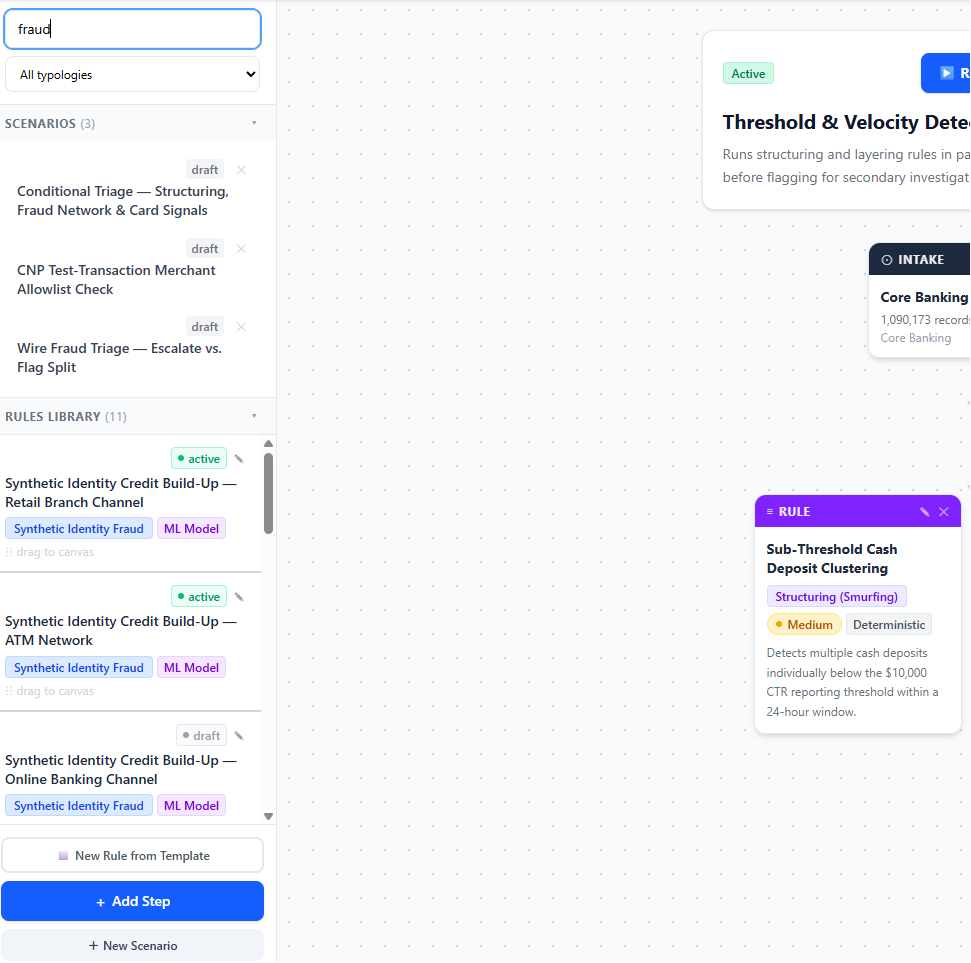
From the list of 20 typologies I had the Claude system build over 100 rules and mock up 12 scenarios. This supported exploring different ways to organize the information for the analyst. The other requirements, and my limited knowledge of the space, led to building within the scenario builder page rather than creating a dedicated rules page. The combination of search and filtering created a means of guiding an analyst to the most appropriate rules for their needs. As it exists, I feel it needs an analyst’s knowledge to use it. This is becuase I limited the experience to searching based on fields in the rules as well as a drop down of all available typologies.
The resulting left-side bar split into two collapseable sections. The search and filters applied to both the scenarios and rules. This allowed for quick filtering and sorting to identify any given rule or scenario in a matter of seconds. It would scale to hundreds or thousands of entries. The analyst could find what they needed and either edit it or drag it into the scenario they were working on. They could also see if scenarios matched rules or typologies they needed to work with. I felt confident it would be a win. I was almost right.
During the debrief the interviewers questioned my decision. I learned many analysts combine rules into “rule sets”. These sets are then used for detection and investigation. I didn’t have a concept of “rule sets” in my design. I asked what the interviewers meant by it. They described related rules, with different combinations of variables and thresholds, grouped together. It could provide specificity or identify if something was suspicious across many dimensions. With the new information a dedicated rules page would make sense for exploring, categorizing, and grouping rules at scale. My solution could then have a third section for “rule sets” to allow the analyst to put them into a scenario in the place of a singular rule.
The experience reinforced to me the limitations of my knowledge as well as those of the Claude systems. I couldn’t think of things I didn’t know were present in the overaching context. The Claude systems either did not have access to the information my interviewers had, or could not figure out the connections between the knowledge and the context I worked in. Either way, it was a stark reminder not to rely on agents in areas where you do not already hold deep expertise. Doing so engenders a false sense of confidence. People tend to assume a level of competence for the systems that they shouldn’t.
Leveraging LangGraph to provide consistency for complex decision trees
I chose to model the Scenario builder on a visual representation of LangGraph from the start. It would communicate the agent (or agents) place within the scenario. It handled configuring logic gates and conditionals. And, LangGraph ensures deterministic pathing based upon the expertise of the analyst. I added specifications to the build plan constraining Claude Code to use LangGraph. I added in functionality to ensure the model’s build executed on real data. These were: a “Run” command with an Execution Log; and a “Run Test” function, for testing on historical data.
The “Run” command and Execution Log for traceability
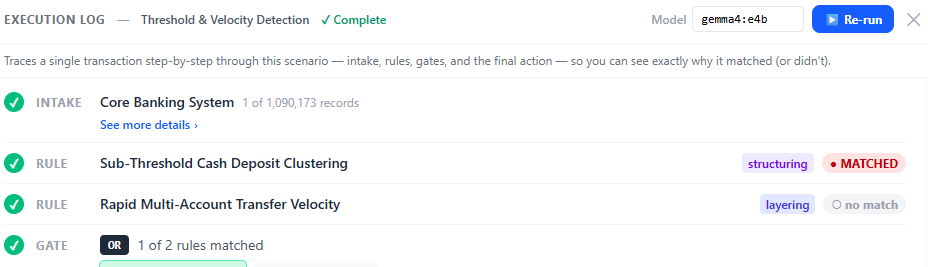
An execution log provides immediate feedback to the analyst as they develop scenarios. They can run iterations to see how their changes affect performance in real time. This provides them with feedback as they build, something many products don’t provide. Elevating test, evaluation, and iteration tools is critical for building trust in LLM-based systems. Keeping it within the same screen as development allows for rapid innovation.
One off testing will not expose systemic issues. It isn’t meant to. It’s a gut check to check whether your choices are plausible. Systems need scalable testing on data sets to supplement ad hoc testing. The Scenario Builder incorporates this by having ga “Run Test” function.
The necessity of “Run Test” using historical data
A friend told me that AML does not have ground truth. Organizations rarely receive feedback on their submissions of SAR (Suspicious Activity Reports). This protects the independence of regulators. It also ensures organizations don’t over-index on particular dimensions based on feedback. So, what can we do to scale testing?
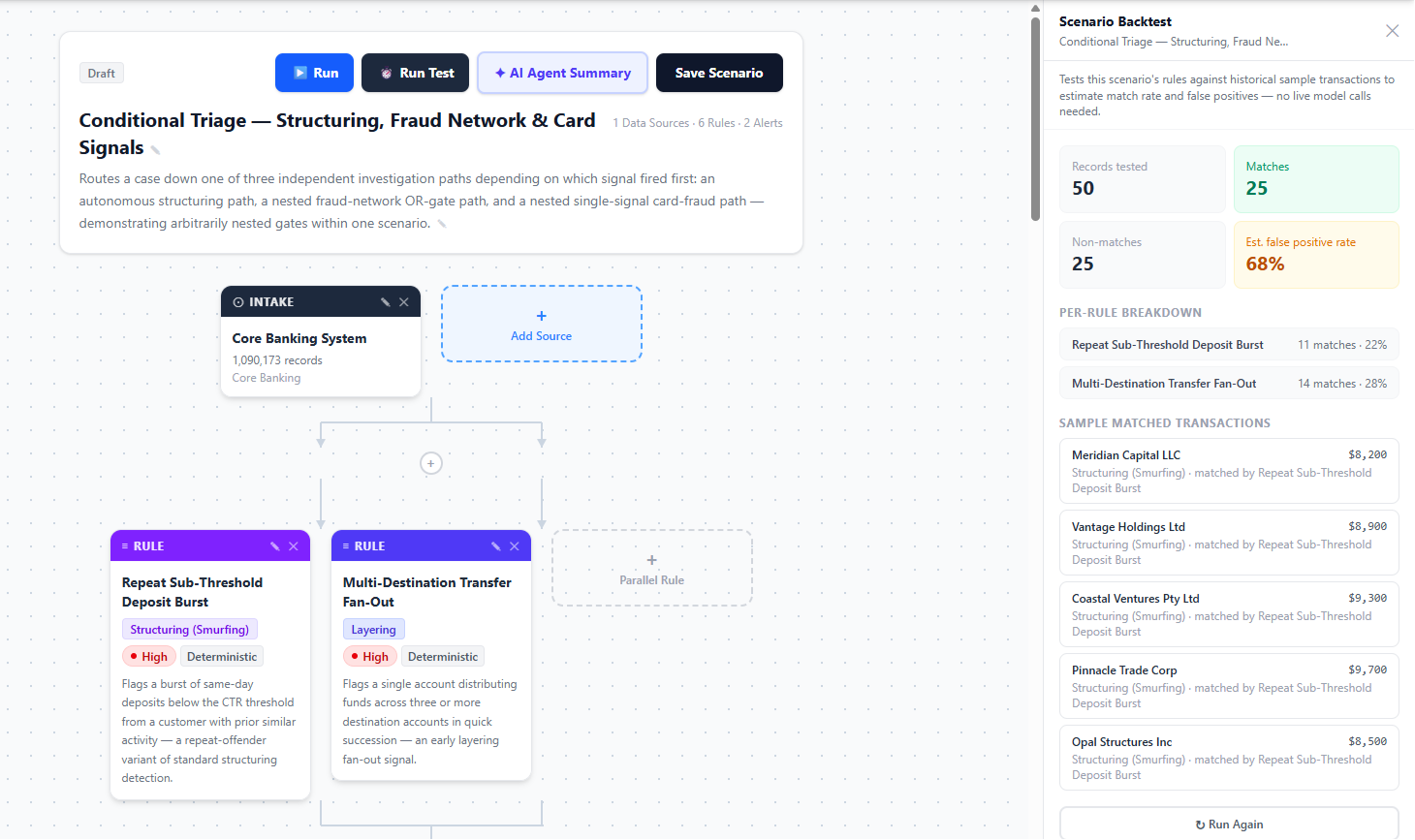
The answer is rather simple: use historical data. This is not easy put in place if the system doesn’t already catalogue every transaction and match it to detection outputs. I made the assumption that the system I built the demo for could handle it, and so had Claude mock up test data. Using this data allowed me to live test every scenario during the demo, changing the scenario at will. It demonstrated the power of using previous data to learn patterns and improve detections over time.
During the debrief the interviewers asked me to explain this in more detail. I pointed out the concept of a closed-loop hazard tracking system (see: MIL-STD-882-E) inspired me. I described the system as a way to track potential issues, along with the controls built or actions taken. This allows the organization to mine the data for testing and new insights.
Imagine the industry defines a new typology, or rule within an existing typology. Your organization creates a rule set for detecting activity related to it. How do you know if it works or how effective your previous rule sets were in covering this area without data? You can’t. A tracking system, which you pull from, allows you to compare new scenarios with previous ones. It also allows you to mine data based on dimensions to test the performance of each scenario.
Some final thoughts
I enjoyed the experience of building this demo. The first day was rough for me. Yet, when I reclaimed my place to use Claude the way I needed to it became much better. I am not sold on this technology providing efficiency gains, or even value, beyond exploratory phases. I will continue to reflect on my experience and the other ways I use this technology.